
Fixed payroll items are managed at Employee Details > Payroll > Payroll Items.
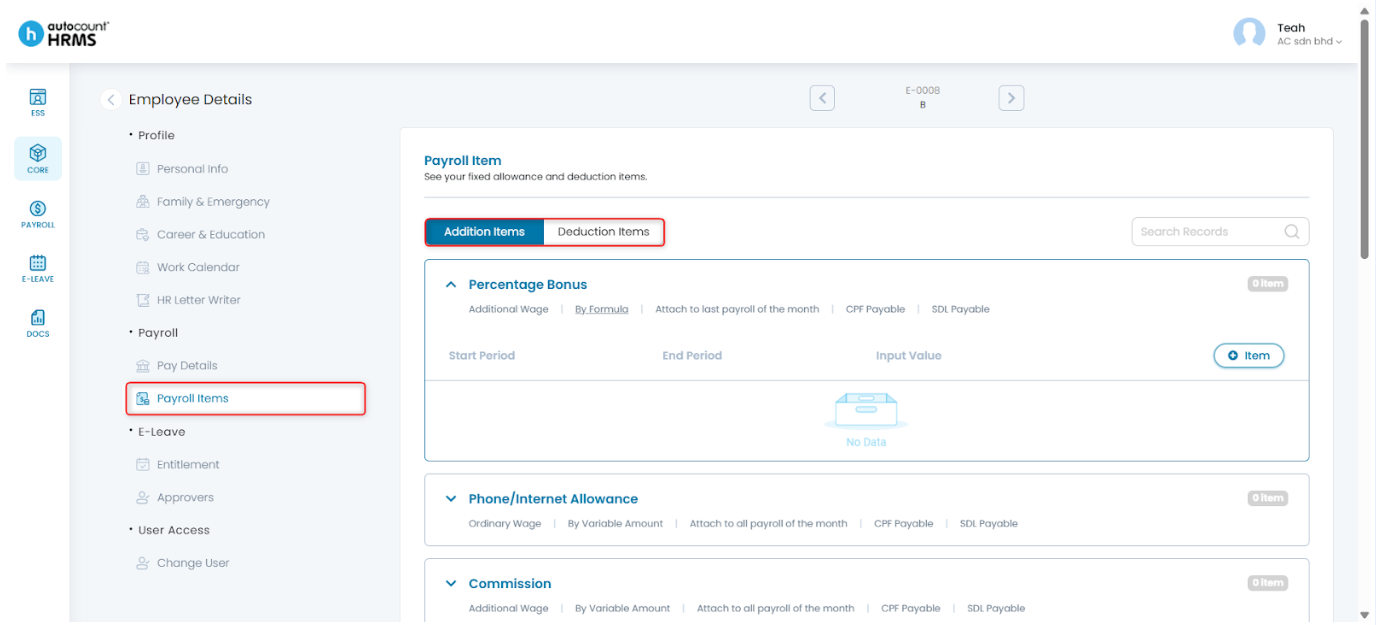
Steps to Add a Fixed Payroll Item:
- Go to Core > Employee.
- Under Employee Maintenance, go to Employee.
- Click the pencil icon beside the employee’s name.
- Under Employee Details, go to Payroll Items.
- Select Additionor Deduction Items.
- Click the downward arrow icon to expand an item.
- Click Add (+) Item.
- Enter the Start and/or End Period (optional) and value accordingly.
- Click Save.
For more detailed explanations, refer to Employee Payroll Items.
Written by: Teah Rui Harn (20251230)
Reviewed by: Tek Ee Lin (20260107)