
The Approval Workflow Configuration feature allows employers to assign specific approvers–typically managers or supervisors to review employees' claim applications.
HRMS supports two types of claim approval methods:
- Sequential Approval – The claim application is routed to approvers in a defined order. If the first approver rejects the application, it will not proceed to the subsequent approvers.
- Parallel Approval – The claim application is sent to all assigned approvers at the same time. All assigned approvers must approve the claim application for it to be fully approved. If any approver rejects the application, the claim application will be rejected.
Steps to Assign Approver(s) to Employee(s):
1. Go to E-Claim > Claim Management > Employee Approvers.
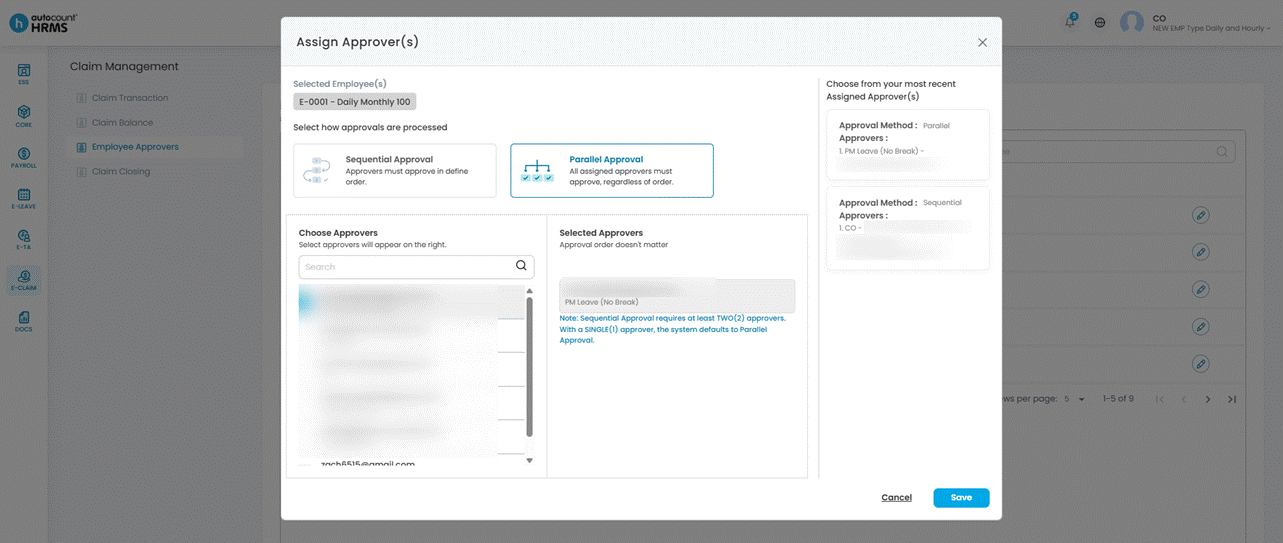
2. Select the workflow type: Sequential or Parallel.
3. Assign approvers in the desired order.
4. Click Save.
ℹ️ Note: The workflow logic follows the same rules as Leave Approval settings.