
Question:
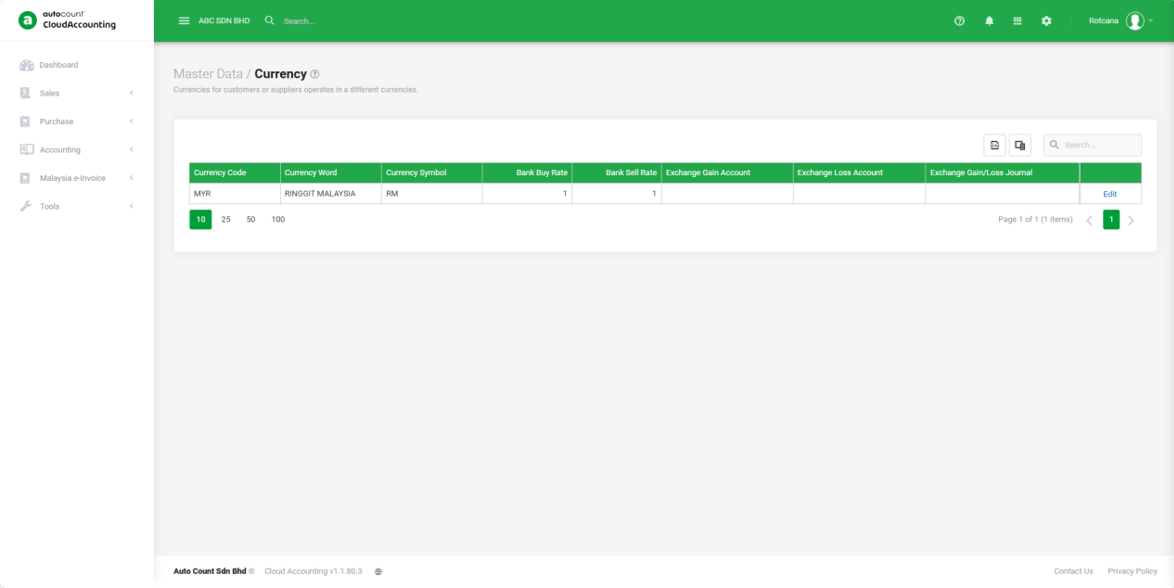
Why is the "+New" Button not available in Currency Maintenance?
Answer:
The +New button in Currency Maintenance is only available on subscription plans that include the Multi-Currency module (Plus, Pro, and Accountant plans). If your current subscription plan does not include the Multi-Currency module, the +New button will be hidden.
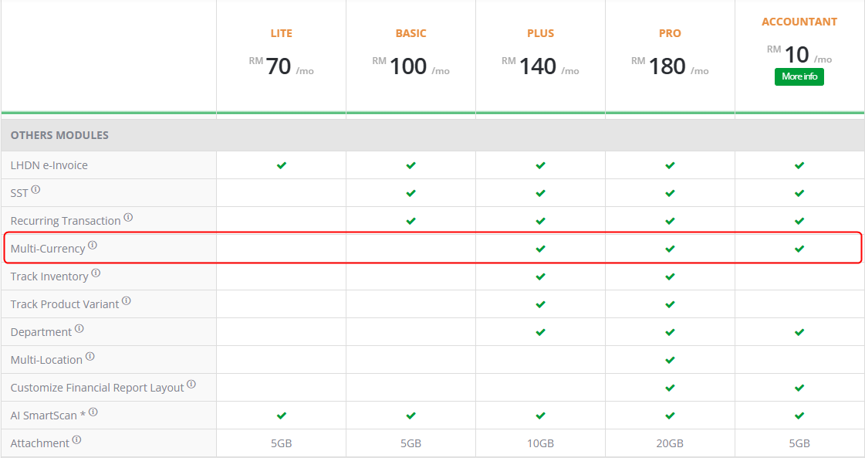
You can enable this feature using one of the following options:
Option 1: Contact our Sales Team
Call 1800 88 7766 or email sales@autocountsoft.com to change your subscription plan to one that includes the Multi-Currency module.
Option 2: Upgrade Your Subscription Plan
You can also upgrade your subscription plan yourself by following this guide: Change Plan During Paid Mode
Important Note
The +New button is hidden based on your subscription plan. This is expected system behavior and is not caused by a system error.
Related Scenarios
- Cannot see +New button in Currency Maintenance.
- Unable to create a new currency.
- Cannot add currency.
- Multi-Currency option not available.
- Why can't I maintain currencies?
- Currency list cannot be edited.
By: Rotcana 260717, Lay Swan 260729